
YouTube Kids for Muslim Parents: A Practical Setup Guide (Filters Aren’t Enough)
You installed YouTube Kids. You set a PIN. You exhaled.
Then your child hummed a song you never approved, asked for a toy from an ad you never saw, or copied a “funny” phrase that made your stomach drop.
Filters aren’t enough.
YouTube Kids is safer than the main app—but it is still a recommendation machine. For Muslim parents, the goal is not fear. It is stewardship: clear settings tonight, a sample whitelist you can defend, and an evening rule that protects Maghrib instead of competing with it.
This guide is English-only parenting guidance, soft Islamic framing, not a fatwa. Follow the scholars and cultural standards you trust. Adapt every list to your child’s age and your home.
Why “Halal YouTube Kids” Needs More Than a Filter
A Muslim parent screen filter is only the first door. Behind it still live:
- Music policies that may not match your home
- Stories that normalize magic-as-power, mockery, or bullying-as-comedy
- Ads and merch pressure even inside “kids” spaces
- Autoplay that keeps going after your intentional pick ends
So when parents search halal YouTube Kids, what they usually need is not a mythic “perfect channel list.” They need:
- Approve Content as the default
- Written whitelist criteria (music, aqidah, ads, tone)
- Timers + Maghrib-tied house rules
- A clear sense of when to switch YouTube Kids off
The Big Idea: Parent-Curated, Not Platform-Trusted
Treat YouTube Kids like a library you stock, not a babysitter you trust.
| Approach | What it feels like | Risk |
|---|---|---|
| Filter-only | “The app will handle it” | Surprise content, music, ads |
| Explore modes | Convenience + discovery | Drift from your values |
| Approve Content + criteria | Slower setup, calm nights | Lowest surprise rate |
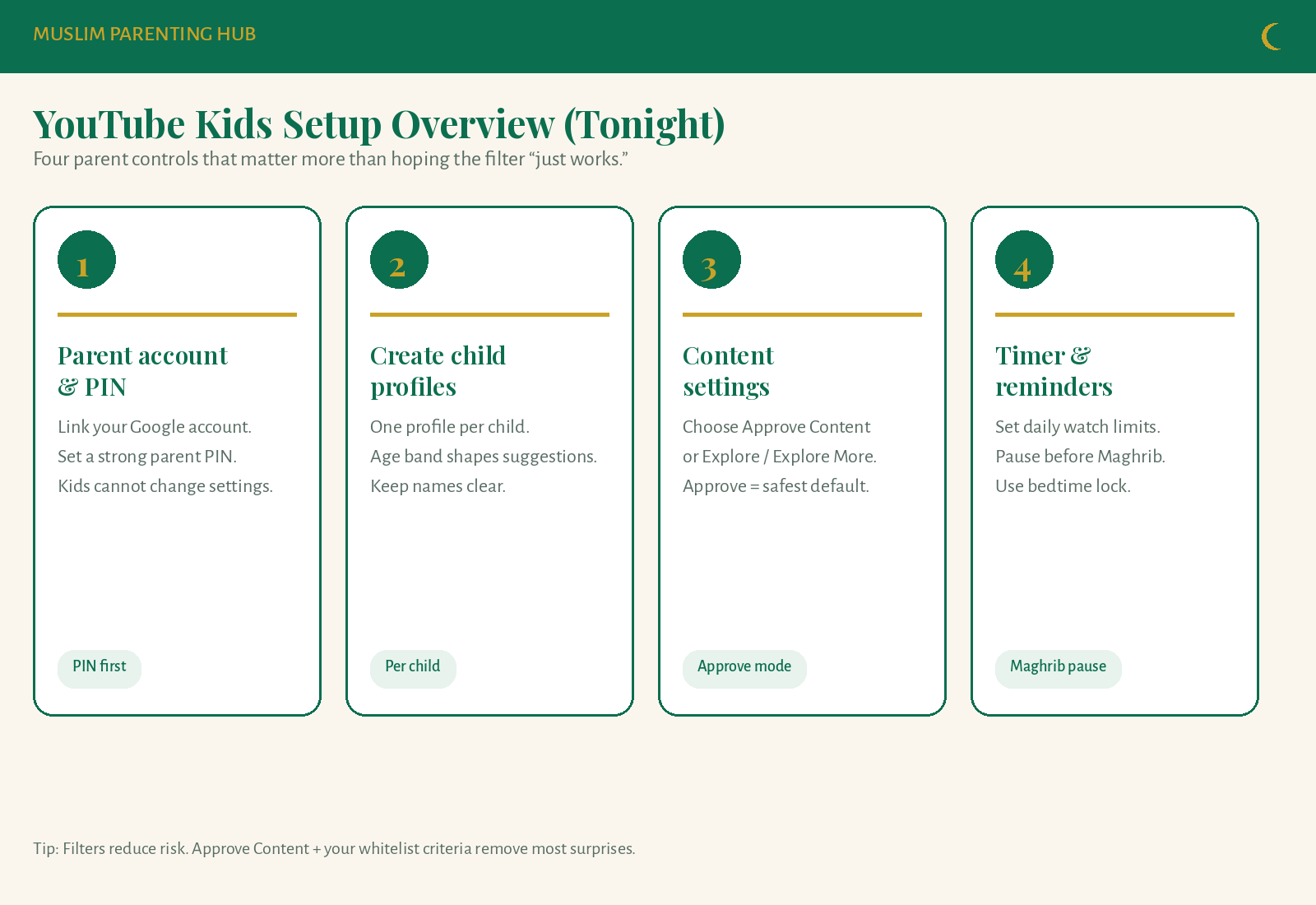
Pin that overview. Tonight you only need four moves: PIN, child profiles, Approve Content, timer.
Tonight Walkthrough: YouTube Kids Setup for Muslim Parents
Do this on the device your child actually uses. Keep snacks nearby. Expect 20–40 minutes the first time; weekly reviews take five.
1) Parent account and a real PIN
- Open YouTube Kids under the parent Google account you control.
- Set / confirm a parent PIN you will not share casually (not “0000,” not your child’s birth year on sticky notes).
- Confirm kids cannot open settings, search freely (in Approve mode), or switch profiles without the PIN.
2) One profile per child
- Create a profile with the correct age band. Age shapes what YouTube suggests—it does not replace your judgement.
- Name profiles clearly (“Yusuf — home tablet”) so grandparents and babysitters don’t mix settings.
- If siblings share a tablet, still keep separate profiles so approvals stay age-fit.
3) Content settings: choose Approve Content
This is the core of YouTube Kids approve content for Muslim homes.
Path (wording can vary slightly by version):
Settings → Content settings → Approve content
- Approve content: nothing shows until you approve a video or channel.
- Explore / Explore More: more discovery, more parental review debt.
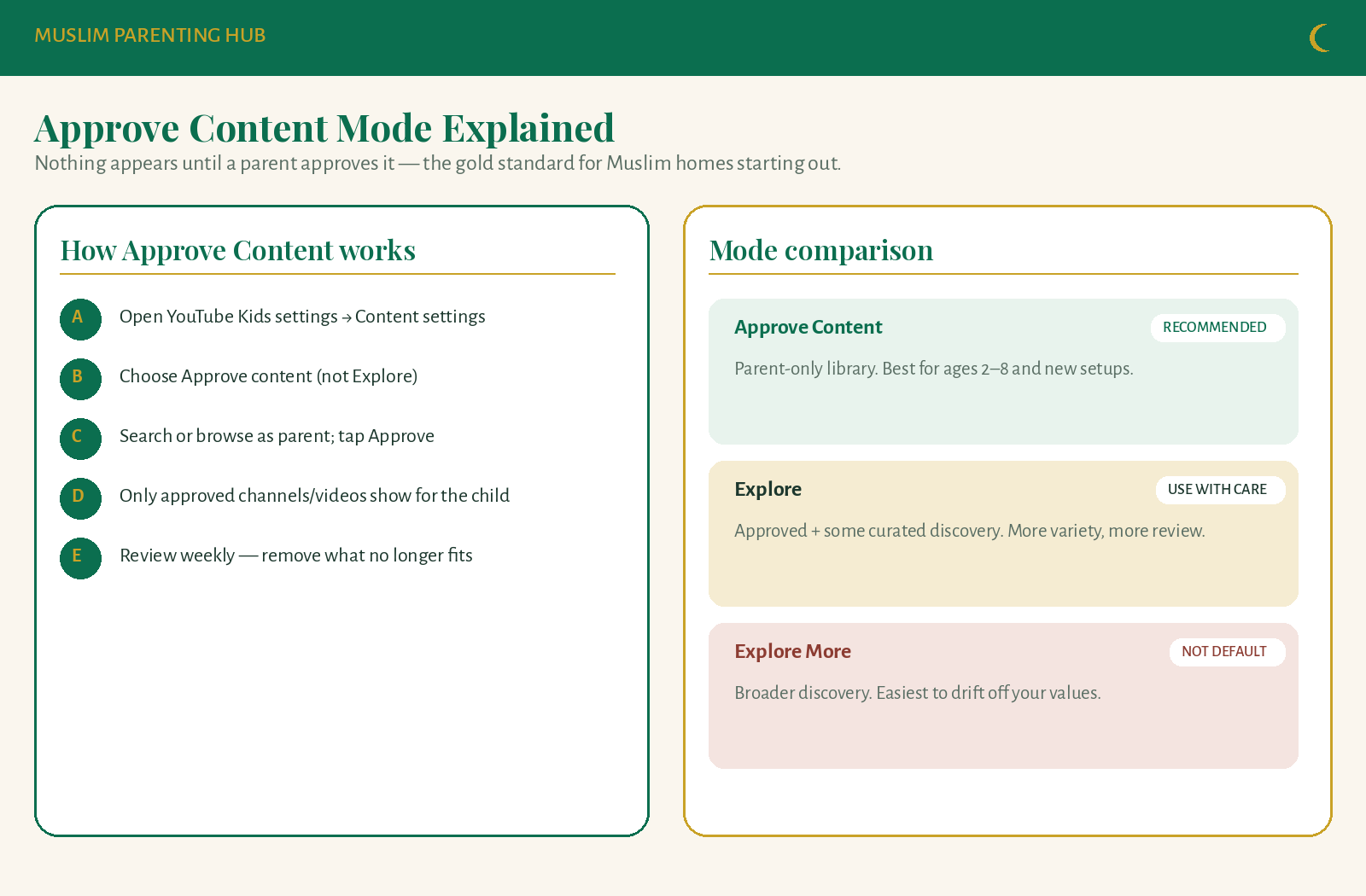
Default recommendation for most Muslim families starting out: Approve Content—especially ages 2–8, new immigrants to English media, or kids who copy speech fast.
4) Timer, bedtime, and Maghrib pause
- Set a daily limit that matches your real life (many homes start with 20–30 minutes).
- Use reminders so the app warns before the session ends.
- Add a pre-Maghrib pause: tablet to charging basket when adhan is near, or 15 minutes before.
- Pair this with your family’s after-school Maghrib flow: The After-School Maghrib Routine That Actually Works for Muslim Families.
Tonight you can say
“We’re making YouTube Kids a library Mom/Dad stocks. You pick from what we approve. Screens sleep before Maghrib.”
What to Allow: Sample Whitelist Criteria
You do not need a thousand channel names. You need criteria you can apply in 30 seconds when a video looks “fine.”
Use this as a sample—not sacred law.
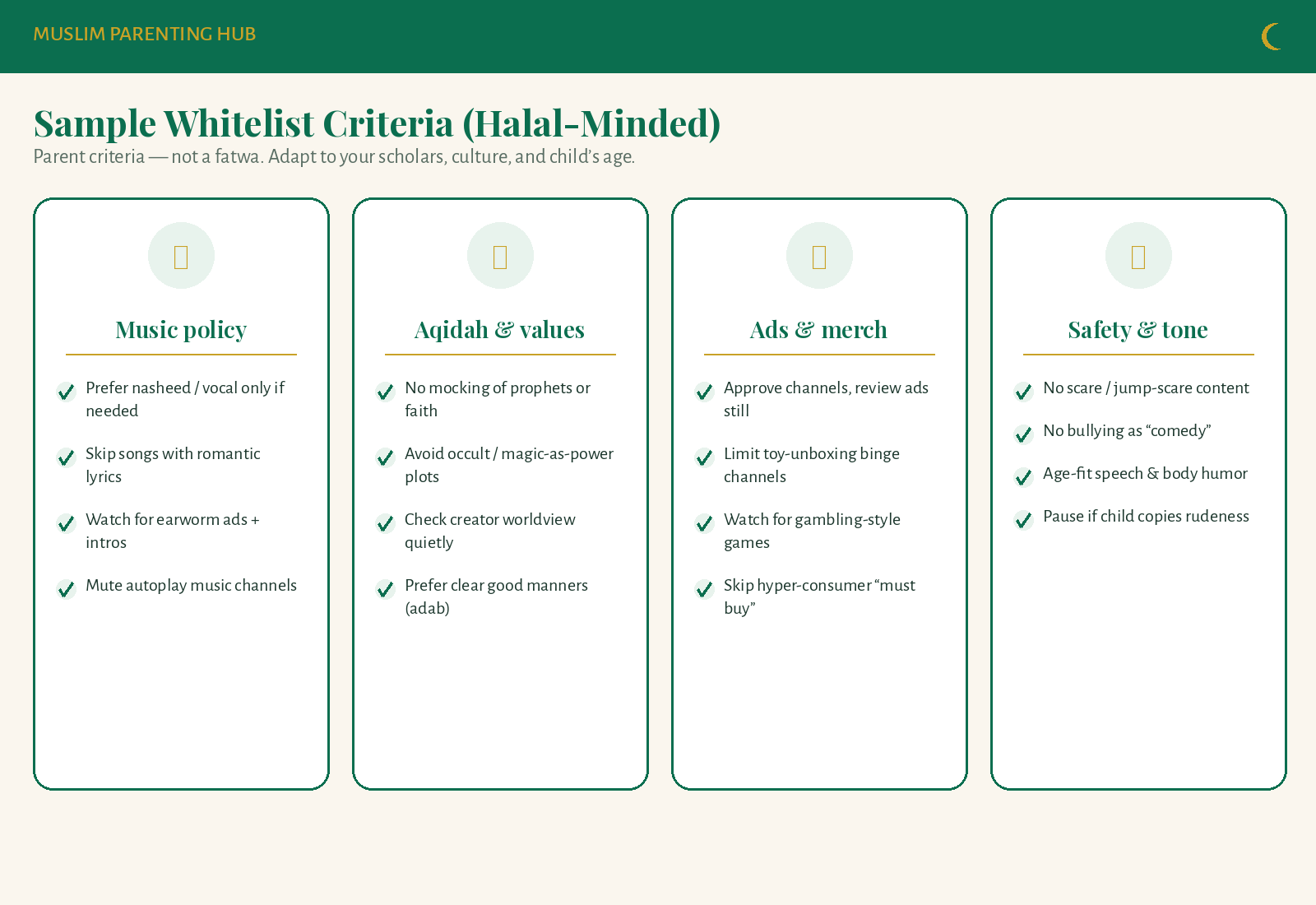
Music policy (sample)
- Prefer quiet narration, nasheed, or vocal styles that match your home standard.
- Skip romantic pop lyrics, club energy, or songs that become all-day earworms.
- Watch intros and outros—many “kids” videos smuggle music you never meant to approve.
- Be careful with endless music-autoplay channels even if one song seemed harmless.
Aqidah & values (sample)
- No content that mocks prophets, salah, hijab, or Muslim identity.
- Be cautious with occult themes, spirit-contact plots, or “magic as your real power” framing—especially for little ones who cannot separate fiction from aqidah yet.
- Prefer shows that model adab: sharing, apology, patience, honesty.
- Quietly check the creator’s broader catalog before approving a whole channel.
Soft note: Families differ on animation, fantasy, and music. Ask scholars you trust for your situation. This article offers parenting filters, not rulings.
Ads, merch & consumer pressure (sample)
- Approving a channel does not erase every ad or end-card. Spot-check periodically.
- Limit binge unboxing / “buy this or you’re left out” energy.
- Avoid gambling-style prize mechanics dressed up as kids’ games.
- If every video ends in a product pitch, it fails the whitelist even if the tone is “cute.”
Safety & tone (sample)
- No jump-scares, horror-lite, or “prank” humiliation.
- No bullying sold as comedy.
- Speech and body humor must fit the child’s age.
- Pause rule: if your child copies rudeness within 24 hours, that title loses approval.
Quick “allow / review / deny” triage
| Signal | Action |
|---|---|
| Calm story, clear manners, fits music policy | Allow (video or trusted channel) |
| Mixed music, mild ads, unknown creator | Review one episode with sound on |
| Mockery of faith, occult focus, aggression, hard sell | Deny and don’t “try just one” |
How to Approve Without Losing Your Evening
Approve Content fails when parents binge-approve fifty titles at bedtime. Use a small weekly ritual instead.
- Friday or Sunday 10 minutes: search 3–5 candidates.
- Watch the first 60–90 seconds and skim middle + end for music/ads.
- Approve videos first; promote to channel approval only after 3 clean samples.
- Keep a shared note: “Approved,” “Maybe,” “Never.”
- Remove titles that stopped fitting—your library should shrink as often as it grows.
Age tweaks
| Age | Whitelist focus |
|---|---|
| Toddler (2–3) | Short, calm, minimal music; parent sits nearby |
| Preschool (4–5) | Manners + simple stories; watch speech copying |
| School-age (6–9) | Stronger aqidah/ad checks; shorter timer; discuss “why we skipped that” |
| Older (10+) | Many families outgrow YouTube Kids—see “when to switch off” below |
Sample Evening Screen Rule (Tied to Maghrib)
Screens should serve the family timetable—not erase salah.
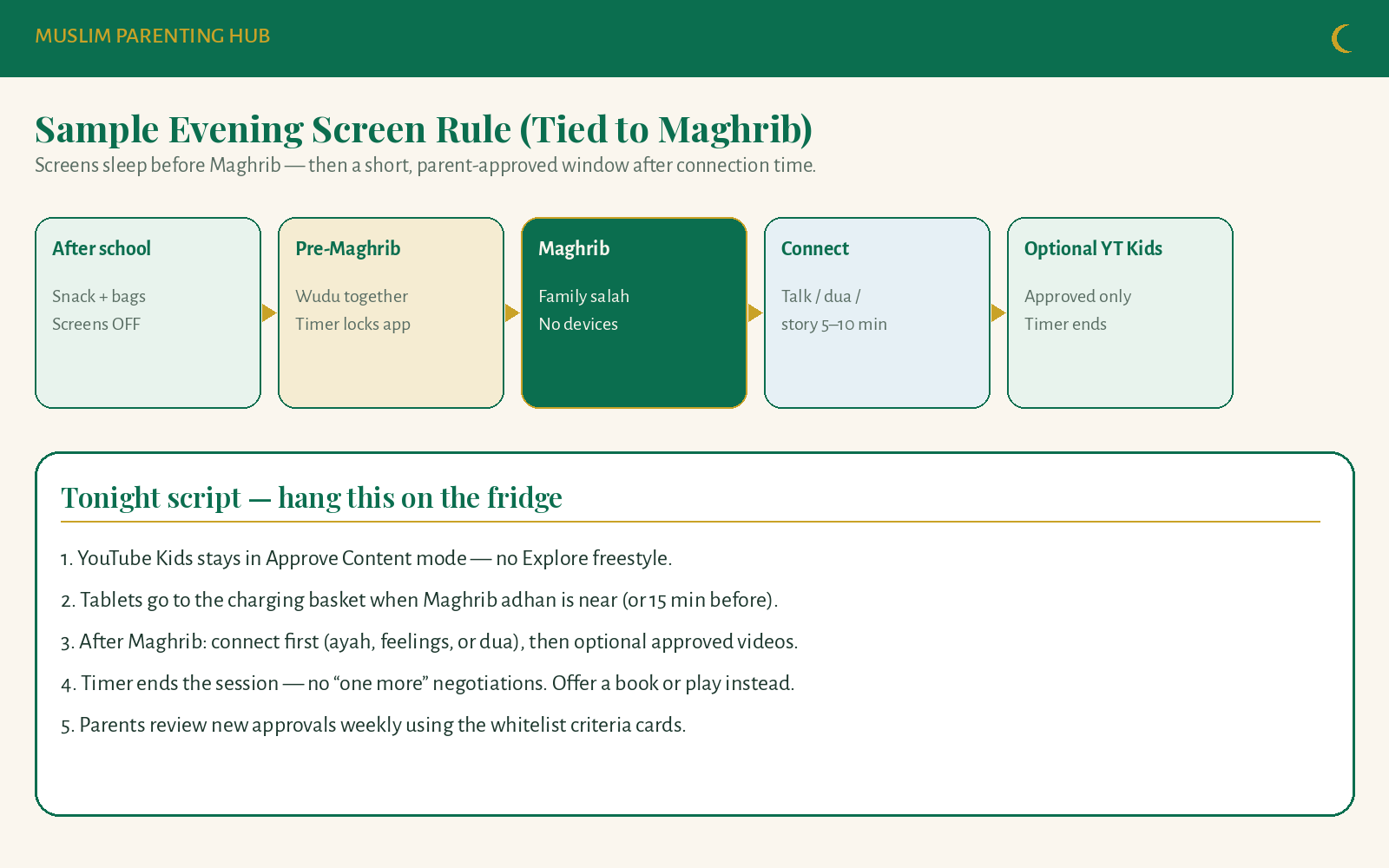
The flow
- After school — snack, bags, screens off
- Pre-Maghrib — wudu together; timer locks the app
- Maghrib — family salah; no devices
- Connect — 5–10 minutes talk, ayah, or dua
- Optional YouTube Kids — approved only; timer ends the session
This pairs cleanly with your Maghrib reset: after-school Maghrib routine for Muslim families.
For mornings, protect worship and presence before entertainment: Deen Before Screen: A Muslim Morning Checklist ← internal link placeholder: deen-before-screen-muslim-morning.
Fridge script
“Basket before Maghrib. Connect after salah. Then maybe one approved show—when the timer sings, we’re done. Books and play are always open.”
When to Switch Off YouTube Kids
YouTube Kids is a tool for a season, not a forever identity.
Consider switching off (or heavily restricting) when:
- Your child routinely bypasses the spirit of the rules (other devices, main YouTube, sneaky accounts).
- Content needs outgrow the Kids app—school research, sports, khutbah clips—and you prefer supervised main YouTube or no YouTube at all.
- You notice mood crashes, sleep delay, salah resistance, or constant “one more.”
- Approvals become a weekly fight instead of a calm library.
- Older kids need digital adab training more than a walled garden—search, citation, knowing when to close the app.
- Your family is in a reset season (Ramadan evenings, travel, new baby) and bandwidth for curation is gone—pause is wiser than neglect.
Switching off is not failure. Sometimes the most Muslim-parent move is fewer platforms, more books, more courtyard time, more board games with clear rules—see also Muslim Kids Video Games Checklist (Halal-Minded) ← internal link placeholder: muslim-kids-video-games-checklist.
Devices, Grandparents & Shared Screens
- Install YouTube Kids only on devices you manage.
- Guest mode / other apps: check that main YouTube is not one tap away for young kids.
- Send grandparents the same Approve Content + Maghrib rule—consistency beats perfect isolation.
- Public tablets (mosque events, cousins’ houses): assume settings differ; supervise or offer offline options.
Bathroom and body privacy still matter in digital homes—kids who learn dignity early carry it online too: Islamic Potty Training: Toilet Manners, Duas & Taharah Tips.
Soft Islamic Framing (Without Turning Media Into a Fatwa)
Islam teaches guarding the eyes, speaking good words, and raising children with care. Screens are a modern test of those older principles.
You do not need to debate every cartoon frame at dinner. You need:
- A default of restraint (Approve Content)
- Clear house criteria you can explain without shouting
- Salah-first evenings so entertainment never outranks Maghrib
- Mercy when you miss a day—and courage to remove a title tomorrow
Parenting guidance, not a fatwa. Ask Allah for tawfiq, consult people of knowledge for rulings that bind your household, and keep the tone gentle with your kids.
FAQs
Is YouTube Kids halal for Muslim children?
YouTube Kids is a tool, not a ruling. Many Muslim parents use it with Approve Content, whitelist criteria, timers, and Maghrib-first house rules. Whether a specific video is appropriate depends on your standards and trusted guidance—not on the app logo.
What is the best YouTube Kids setup for Muslim parents?
Link a parent account, set a strong PIN, create age-fit profiles, choose Approve Content, set a daily timer, and pause screens before Maghrib. Stock a small approved library using clear music, aqidah, ads, and tone criteria.
What should Muslim parents allow on YouTube Kids?
Allow calm, age-fit videos that match your music policy, protect aqidah and manners, limit hard-sell ads/merch, and avoid scare or bullying humor. Approve slowly; remove quickly when copying or mood problems appear.
Is Approve Content better than Explore on YouTube Kids?
For most Muslim families starting out—yes. Approve Content shows only what you authorize. Explore modes add discovery and require more ongoing review.
How do I make a YouTube Kids whitelist?
Write criteria first (music, aqidah/values, ads, safety/tone). Then approve individual videos; graduate trusted channels only after several clean samples. Review weekly.
Should kids watch YouTube Kids after Maghrib?
Many homes do better with: screens off before Maghrib → pray → short connection → optional approved videos with a hard timer. See the after-school Maghrib routine.
When should we stop using YouTube Kids?
When rules are routinely bypassed, moods or salah suffer, curation becomes constant conflict, or the child outgrows the Kids environment. Pause or move to supervised alternatives—or no YouTube for a season.
Do filters remove haram music and bad ads?
Not reliably. Filters reduce some risk; they do not replace parent approval, spot-checking ads, and house criteria.
Your 15-Minute Action Plan (Tonight)
- Set / strengthen the parent PIN.
- Switch the child’s profile to Approve Content.
- Approve 3–5 calm videos that pass your criteria cards.
- Set a timer and a pre-Maghrib basket rule.
- Say the fridge script once as a family—calm voice, clear expectation.
You are not raising children to fear every screen. You are teaching them that we choose what enters our home—and that Maghrib still comes first.
Muslim Parenting Hub — practical guides for real Muslim homes. Soft faith framing, never a substitute for personal scholarly advice.
FAQs
Is YouTube Kids halal for Muslim children?
YouTube Kids is a tool, not a ruling. Many Muslim parents use it with Approve Content, whitelist criteria, timers, and Maghrib-first house rules. Whether a specific video is appropriate depends on your standards and trusted guidance.
What is the best YouTube Kids setup for Muslim parents?
Link a parent account, set a strong PIN, create age-fit profiles, choose Approve Content, set a daily timer, and pause screens before Maghrib. Stock a small approved library using clear music, aqidah, ads, and tone criteria.
What should Muslim parents allow on YouTube Kids?
Allow calm, age-fit videos that match your music policy, protect aqidah and manners, limit hard-sell ads/merch, and avoid scare or bullying humor. Approve slowly; remove quickly when copying or mood problems appear.
Is Approve Content better than Explore on YouTube Kids?
For most Muslim families starting out—yes. Approve Content shows only what you authorize. Explore modes add discovery and require more ongoing review.
How do I make a YouTube Kids whitelist?
Write criteria first (music, aqidah/values, ads, safety/tone). Then approve individual videos; graduate trusted channels only after several clean samples. Review weekly.
Should kids watch YouTube Kids after Maghrib?
Many homes do better with screens off before Maghrib, then pray, a short connection time, then optional approved videos with a hard timer.
When should we stop using YouTube Kids?
When rules are routinely bypassed, moods or salah suffer, curation becomes constant conflict, or the child outgrows the Kids environment. Pause or move to supervised alternatives—or no YouTube for a season.
Do filters remove haram music and bad ads?
Not reliably. Filters reduce some risk; they do not replace parent approval, spot-checking ads, and house criteria.